Recently I installed debian on a raspberrypi using a very minimalist version to maximize the usability of the raspberry pi 3B+ as it\’s limited in resources with only 1 Gb of RAM.
as a good test for this board and also give a hand to the tor project.
Install packges
sudo apt install wget gpg apt-transport-https apt-config-auto-update unattended-upgrades apt-listchangesConfigure unattended upgrades
Edit file /etc/apt/apt.conf.d/50unattended-upgrades. Comment with // every line starting like this from:
//Unattended-Upgrade::Origins-Pattern {
to its end curly bracket
//}
Then add these lines following the commented section:
Unattended-Upgrade::Allowed-Origins {\n \"${distro_id}:${distro_codename}-security\";\n \"TorProject:${distro_codename}\";\n };\n Unattended-Upgrade::Package-Blacklist {\n };Edit file /etc/apt/apt.conf.d/20auto-upgrades and add:
APT::Periodic::Update-Package-Lists \"1\";
APT::Periodic::Unattended-Upgrade \"1\";
APT::Periodic::Autocleaninterval \"5\";
APT::Periodic::verbose \"1\";
Test the unattended upgrades:
sudo unattended-upgrades -dConfigure Tor repositories
2. Create a new file in /etc/apt/sources.list.d/ named tor.list. Add the following entries:
deb [signed-by=/usr/share/keyrings/tor-archive-keyring.gpg] https://deb.torproject.org/torproject.org bookworm main\ndeb-src [signed-by=/usr/share/keyrings/tor-archive-keyring.gpg] https://deb.torproject.org/torproject.org bookworm mainThen add the gpg key used to sign the packages
Must be executed with root account as sudo might not work. Type exit once the command has finished working.
su -sudo wget -qO- https://deb.torproject.org/torproject.org/A3C4F0F979CAA22CDBA8F512EE8CBC9E886DDD89.asc | gpg --dearmor | tee /usr/share/keyrings/tor-archive-keyring.gpg >/dev/nullInstall Tor
sudo apt install tor deb.torproject.org-keyringEdit Tor configuration by editing the /etc/tor/torrc file and add the following lines:
To test Tor for 1 month I\’ll assign 500 GB/month and check daily how its behaving the tor relay on my raspberry pi.
Nickname myNiceRelay # Change \"myNiceRelay\" to something you like\nContactInfo your@e-mail # Write your e-mail and be aware it will be published\nORPort 443 # You might use a different port, should you want to\nExitRelay 0\nSocksPort 0\n\n## BANDWIDTH\n## The config below has a maximum of 500GB (up/down) per month, starting on the 1st at midnight\nAccountingMax 500 GB\nAccountingStart month 1 0:00\n\n## MONITORING\nControlPort 9051\nCookieAuthentication 1\nsudo systemctl enable tor && sudo systemctl restart torVerify it\’s running and enabled
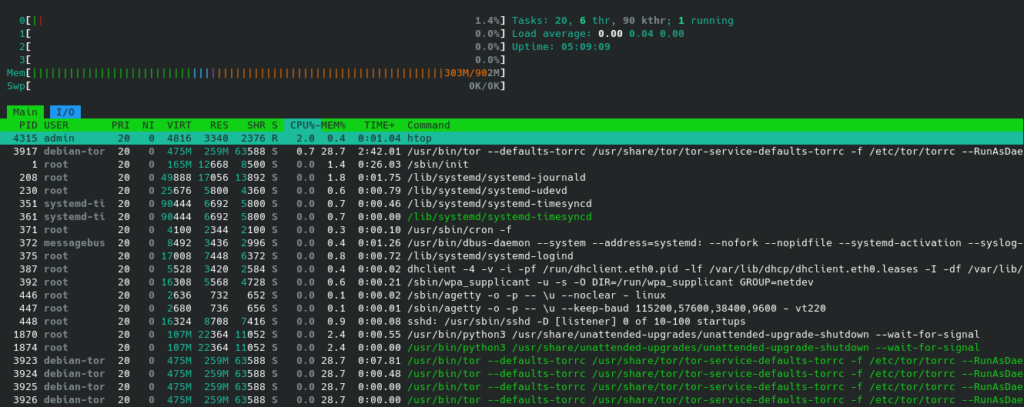
sudo systemctl status torhtop shows overall little resources consumption
Optional
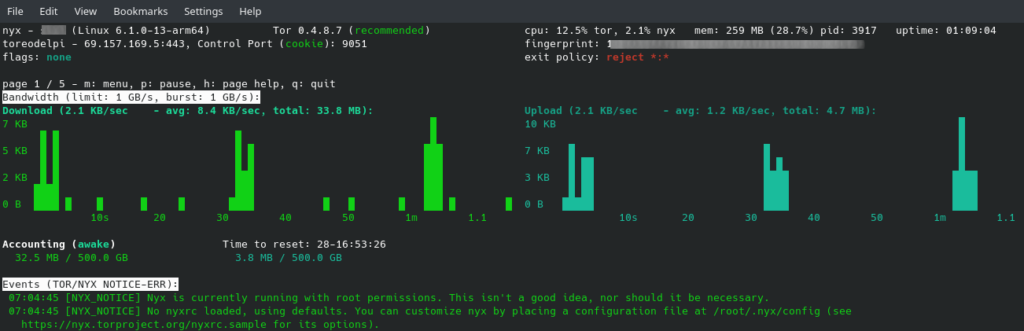
Install nyx (sudo apt install nyx) to have a visual depiction of what\’s happening in your recently installed Tor relay.
Sources
https://support.torproject.org/apt/tor-deb-repo/
https://community.torproject.org/relay/setup/guard/debian-ubuntu/updates/
https://www.youtube.com/watch?v=tBnJRraXDc0\n